

A small model I built myself — nothing impressive.
Preface & Project Introduction
This project took me nearly half a semester to complete. At first I was just following a tutorial, learning about the various components of transformers — self-attention mechanisms, embeddings, positional encoding, etc. — but I could never piece them together. This was a great opportunity to integrate everything into a small model that anyone could build.
Even though it’s beginner-level, I’m still quite satisfied with it.
Personal repository: cateude/transformer_segment
What I think are its strengths:
- Good documentation habits (well, I just created a CLAUDE.md)
- Uses PASCAL VOC 2012 — rigorous data source with clear train/val separation (no training set parameters leaked into the test set — that would be wrong!)
- Clean interface design, controllable parameters, logging support — much easier to trace than hardcoded scripts
- Proper device handling — that’s about it
But there are quite a few shortcomings:
- Validation only runs the first 20 batches (sorry, my computer just can’t handle more)
- The data pipeline assumes ideal input — didn’t account for edge cases when writing it (PS: my bad)
- Config has all the parameters, but other code blocks also have parameters in their class definitions — tuning is relatively cumbersome
Project Framework
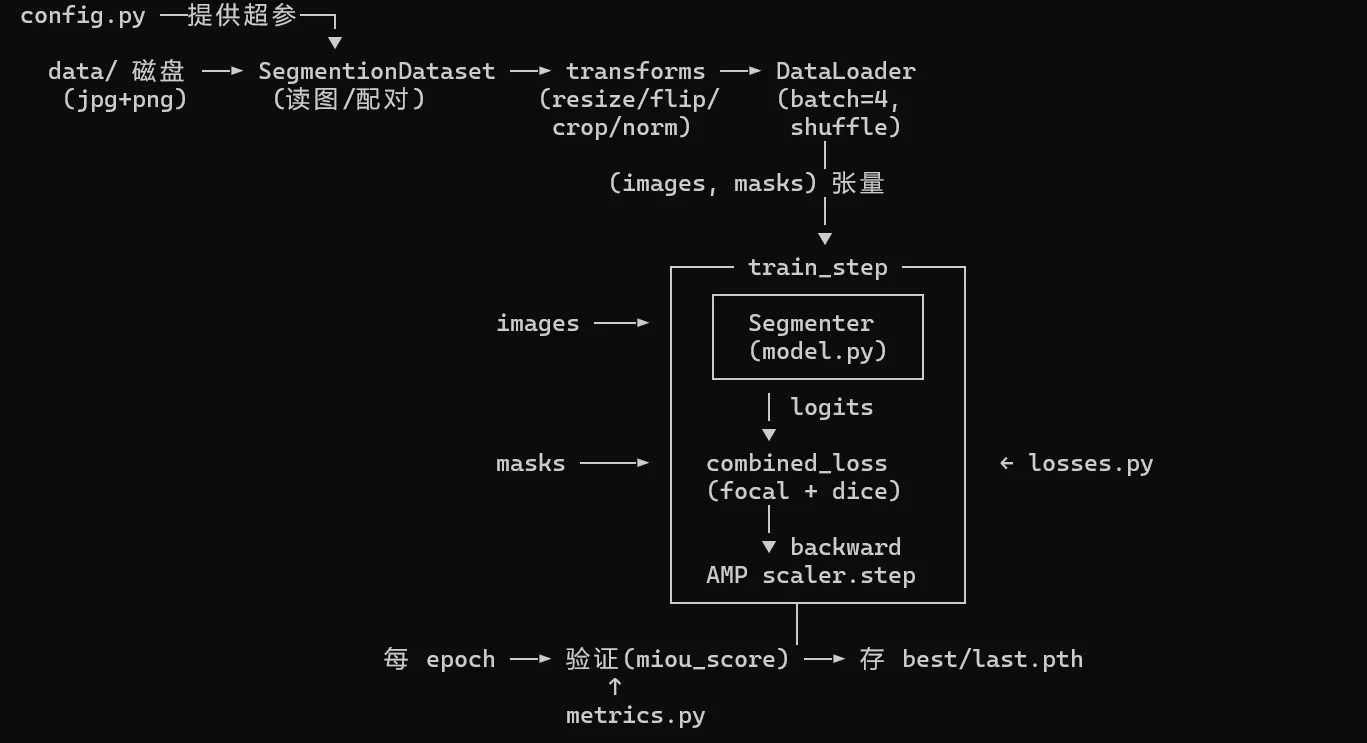
Project Details
Model Branch Building: ViT and Decoder
First, I built the ViT and decoder files — one for encoding, one for decoding.
def __init__(self, num_patches: int = 576, embed_dim: int = 384, depth: int = 8,
             num_heads: int = 6, patch_size: int = 16, pretrained: bool = True):
    super().__init__()
    if embed_dim not in _TIMM_NAME:
        raise ValueError(f"No timm model for embed_dim={embed_dim}, supports {list(_TIMM_NAME)}")
    image_size = int(num_patches ** 0.5) * patch_size

    self.backbone = timm.create_model(
        _TIMM_NAME[embed_dim],
        pretrained=pretrained,
        num_classes=0,
        img_size=image_size,
    )
    self.num_prefix_tokens = self.backbone.num_prefix_tokens

def forward(self, x):
    tokens = self.backbone.forward_features(x)
    return tokens[:, self.num_prefix_tokens:, :]
PS: Due to training performance issues, I had to bring in the timm module as a helper — boohoo!
Model Composition: model.py
In model.py, I connected these two components and added a learnable temperature parameter.
class Segmenter(nn.Module):
    def __init__(self, num_classes = 21, image_size = 384, patch_size = 16,
                 embed_dim = 768, encoder_depth = 12, encoder_heads = 12,
                 decoder_depth = 4, decoder_heads = 12):
        super().__init__()
        self.num_classes = num_classes
        self.image_size = image_size
        self.patch_size = patch_size
        num_patches = (image_size // patch_size) ** 2
        self.encoder = VIT(num_patches = num_patches, embed_dim = embed_dim, depth = encoder_depth, num_heads = encoder_heads, patch_size = patch_size)
        self.decoder = MaskTransformer(embed_dim = embed_dim, num_heads = decoder_heads, num_classes = num_classes, depth = decoder_depth)
        self.logit_scale = nn.Parameter(torch.log(torch.tensor(1.0 / 0.07)))

    def forward(self, x):
        B = x.shape[0]
        patch_tokens = self.encoder(x)
        cls_embedding = self.decoder(patch_tokens)

        patch_tokens = F.normalize(patch_tokens, dim = -1)
        cls_embedding = F.normalize(cls_embedding, dim = -1)
        logit_scale = self.logit_scale.exp().clamp(max = 100.0)
        logits = logit_scale * (patch_tokens @ cls_embedding.transpose(1, 2))
        logits = logits.permute(0, 2, 1)

        H_patch = W_patch = x.shape[2] // self.patch_size
        logits = logits.reshape(B, self.num_classes, H_patch, W_patch)

        logits = F.interpolate(logits, size = (self.image_size, self.image_size), mode = 'bilinear', align_corners = False)

        return logits
Data Processing: Dataset and Transforms
The dataset separates training and test sets, with image loading included.
The transforms are the classic trio (Resize, ToTensor, Normalize), with RandomCrop and RandomHorizontalFlip added for the training set.
class Resize:
    def __init__(self, size):
        self.size = size

    def __call__(self, sample):
        image = sample["image"]
        mask = sample["mask"]
        image = F.resize(image, self.size, InterpolationMode.BILINEAR)
        mask = F.resize(mask, self.size, InterpolationMode.NEAREST) if mask is not None else None
        return {"image": image, "mask": mask}

class ToTensor:
    def __call__(self, sample):
        image = sample["image"]
        mask = sample["mask"]
        image = F.to_tensor(image)
        mask = torch.as_tensor(np.array(mask), dtype=torch.long) if mask is not None else None
        return {"image": image, "mask": mask}

class Normalize:
    def __init__(self, mean, std):
        self.mean = mean
        self.std = std

    def __call__(self, sample):
        image = sample["image"]
        mask = sample["mask"]
        image = F.normalize(image, mean=self.mean, std=self.std)
        return {"image": image, "mask": mask}
Loss Function and Evaluation: Losses and Metrics
Don’t get confused — losses are for the model to evaluate during training. Metrics are for you (the reader) to check during validation/testing.
Single-Step Training: train_step
A single training step: forward pass, backward pass, optimizer update — the classic five-step training routine.
def train_step(model, images, masks, optimizer, scaler, criterion) -> float:
    optimizer.zero_grad()
    device_type = images.device.type

    with torch.amp.autocast(device_type):
        logits = model(images)
        loss = criterion(logits, masks)

    scaler.scale(loss).backward()
    scaler.step(optimizer)
    scaler.update()

    return loss.item()
Training: train
Brings all the modules together to train the model.
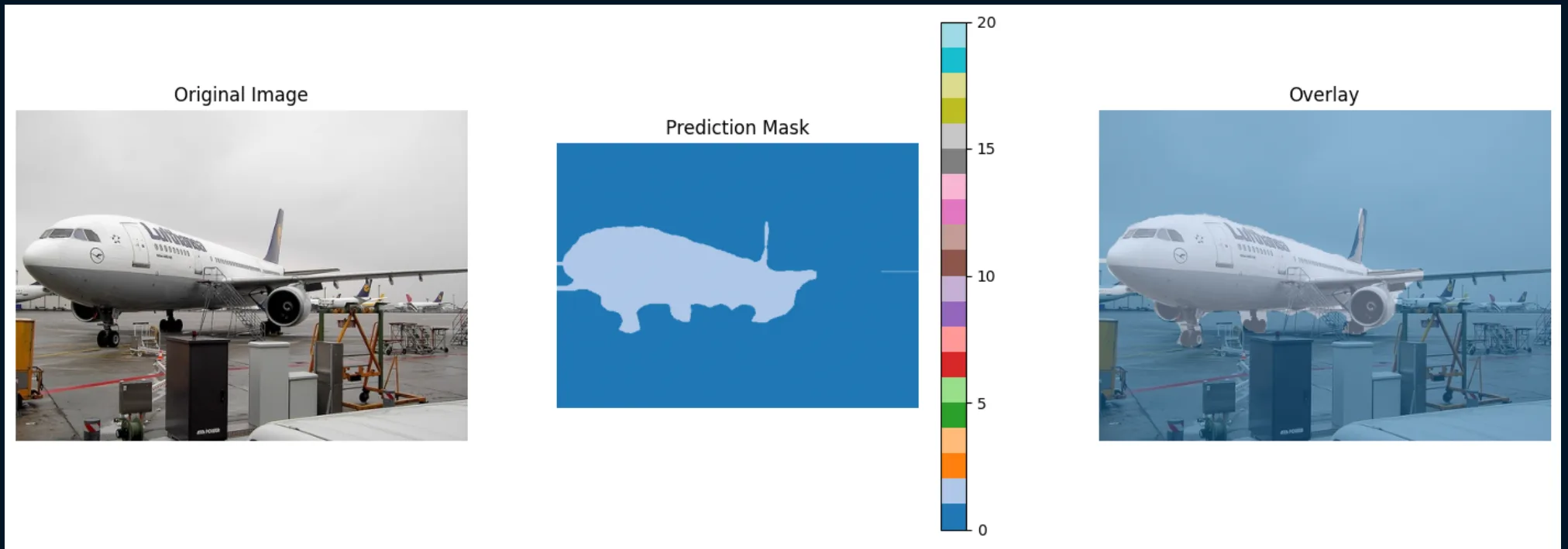
Results: predict
Shows the final results.
How to Run
It’s simple:
- Install the uv package:
pip install uv(or use a faster method) - Install the GPU package matching your setup (PS: this held me up for an entire day — truly绝望)
- In the terminal, run:
uv run python train.py - Wait patiently for training to complete (takes about 1 hour)
- In the terminal, run:
uv run python predict.py, and an image will be generated in your output folder
Conclusion
As a complete beginner just starting out in deep learning, I’ve graduated from watching tutorials to actually building and reproducing models from scratch (⊙﹏⊙) (Ciallo~(∠・ω< )⌒★)